前言
- 主流程:oneplus 3T 氧3.5.1 → 氧5.0.3 → 氧9.0.6 → neos20 → dp d2
- 涉及资源:https://pan.baidu.com/s/1IMv_wTzCNvucA1YZpm_CYw?pwd=darp
示意图
C2部署

C2刷机流程

DP模型流程

DP安装
刷入一加氧9.06
- usb连接手机
- 手机处于QUSB__BULK模式
- 状态说明:手机各种格式化,意外黑屏,usb连接只能看到这个问号设备
- 安装驱动:Qualcomm HS-USB QDLoader 9008 2.1.0.5_x64.7z、fastboot_driver_64.exe、OppoUSBDriverSetupV4.0.1.6.exe
- 设备识别:设备管理出现 Qualcomm HS-USB QDLoader 9008
- 手机处于Qualcomm QDLoader 9008模式
- 9008 救砖包:OnePlus 3T 线刷售后救砖_Oxgen3.5.1.7z
- 运行工具:MsmDownloadTool V3.0.exe,管理员运行start就可以了,提示绿色文字文件下载完毕就成功了
- 提示sahara通讯失败解决
- 禁用强制签名:win10-设置-更新-恢复-高级启动-7模式
- fastboot关闭电源或长按电源40秒强关,再音量上+音量下按住+连接usb2.0数据线
- 提示sahara通讯失败解决
- 重启手机:进氧系统桌面
手机进官方recovery,adb sideload 安装Oxygen 5.0.3全量包,再进系统桌面
D:\OS\ANDROID\oneplus3T\一加官方>adb sideload OnePlus3TOxygen_28_OTA_064_all_1805171658_ad0d08e196b84e03.zip Total xfer: 2.00x手机进官方recovery,adb sideload 安装Oxygen 9.0.6全量包,再进系统桌面
D:\OS\ANDROID\oneplus3T\一加官方>adb sideload OnePlus3TOxygen_9.0.6_28_OTA_086_all_1911042121_9156030ead54e.zip Total xfer: 2.00x- 从neos回退氧:刷官方recovery,刷氧全量包
刷入neos20
- 手机进bootloader
- 安装驱动:google_usb_driver_20211104\android_winusb.inf右键安装
- 设备识别:设备管理里有Android Bootloader Interface
fastboot devices可以看到设备,就可以用fastboot命令操作手机了
D:\OS\ANDROID\oneplus3T\eonneos\eon-neos-20>fastboot devices
83c425ed         fastboot
此时为官方全套状态,先解锁:手机设置-开发者-解锁; fastboot oem unlock
D:\OS\ANDROID\oneplus3T\一加官方>fastboot oem unlock
OKAY [  0.032s]
Finished. Total time: 0.034s
通过fastboot进临时twrp
D:\OS\ANDROID\oneplus3T\一加官方>fastboot boot D:\OS\ANDROID\oneplus3T\recovery\twrp-3.3.1-0-oneplus3t.img
Sending 'boot.img' (29821 KB)                      OKAY [  0.855s]
Booting                                            OKAY [  0.492s]
Finished. Total time: 1.394s
- 手机进twrp
- 设备识别:设备管理里有Android Bootloader Interface
adb devices可以看到设备,就可以用adb命令操作手机了
D:\OS\ANDROID\oneplus3T\eonneos\eon-neos-20>adb devices List of devices attached 83c425ed recovery- 彻底清分区(跨系统必做):格式化 Data清除加密,再清除Cache、Dalvik/ART、Data、System。用twrp-3.3.1-0-oneplus3t.img成功,用高版本3.7.0反而失败
刷入Neos20系统:neos.zip > update.zip > 格式化data > fastboot刷neos-recovery.img
D:\OS\ANDROID\oneplus3T\eonneos\eon-neos-20>adb sideload ota-signed-e5aa34ebb27977779db4e82439cca8f807e9c9ee2c84c217c926a2d08dd2959f.zip
Total xfer: 1.00x

D:\OS\ANDROID\oneplus3T\eonneos\eon-neos-20>adb sideload update.zip
Total xfer: 1.28x

---------手机进入fastboot-----------
D:\OS\ANDROID\oneplus3T\eonneos\eon-neos-20>fastboot flash recovery recovery-cf752ceb7931aa427ccec384fd21d9425c6053f25161814dab31ec75e4d296b0.img
Sending 'recovery' (14865 KB)                      OKAY [  0.412s]
Writing 'recovery'                                 OKAY [  0.118s]
Finished. Total time: 0.642s
安装dp D2
- 进neos系统,连接网络后,100%会提示网络不可用,无法continue
- 因为comma.ai 已经没有可用的节点来判断设备是否联网,实际上已连接
- 意味着你无法通过界面操作的完成neos设置,再连接neos终端,再安装dp分支
- 方案一:连接SSH后手动git
- 默认私钥:
- https://raw.githubusercontent.com/commaai/openpilot/master/system/hardware/tici/id_rsa
- https://github.com/ophwug/c2-neos-alt-fix-install/blob/main/cmd/installer/resources/id_rsa
- 生成对应pub公钥:ssh-keygen -y -f id_rsa > id_rsa.pub
- 连接命令:ssh -i [pathname of saved id_rsa] comma@[your-c2-ip-address]
- 进终端后,用命令拉取项目代码,重启设备
拉取仓库代码
cd /data
git clone -b d2 --depth 1 https://github.com/dragonpilot-community/openpilot.git openpilot
当前仓库分支
root@localhost:/data/openpilot$ git remote -v
origin  https://github.com/dragonpilot-community/openpilot.git (fetch)
origin  https://github.com/dragonpilot-community/openpilot.git (push)
root@localhost:/data/openpilot$ git branch
* r2
查看远端分支
root@localhost:/data/openpilot$ git ls-remote --heads origin
3bc69705461099efff8335bda872edaf2528b157        refs/heads/0.10.0
...
f965f86fb77f3919b1d558dd279f0614f22c76c4        refs/heads/d2

...
c1024d1d000047c49419b30145a338c069a343d7        refs/heads/r2
清理残留
root@localhost:/data/openpilot$ git gc --prune=now
Enumerating objects: 1893, done.
Counting objects: 100% (1893/1893), done.
Delta compression using up to 4 threads
Compressing objects: 100% (1489/1489), done.
Writing objects: 100% (1893/1893), done.
Total 1893 (delta 327), reused 1893 (delta 327)
root@localhost:/data/openpilot$ git fsck --full
Checking object directories: 100% (256/256), done.
Checking objects: 100% (1893/1893), done.
root@localhost:/data/openpilot$ git reset --hard HEAD
HEAD is now at c1024d1 lp-dp 2024-02-06T11:12:13 for EON/C2
切换分支
root@localhost:/data/openpilot$ git fetch origin 0.8.13:remotes/origin/0.8.13 --depth 1
remote: Enumerating objects: 1542, done.
remote: Counting objects: 100% (1542/1542), done.
remote: Compressing objects: 100% (993/993), done.
remote: Total 1137 (delta 355), reused 818 (delta 113), pack-reused 0 (from 0)
Receiving objects: 100% (1137/1137), 133.35 MiB | 792.00 KiB/s, done.
Resolving deltas: 100% (355/355), completed with 236 local objects.
From https://github.com/dragonpilot-community/openpilot
 * [new branch]      0.8.13     -> origin/0.8.13
root@localhost:/data/openpilot$ git checkout -b 0.8.13 origin/0.8.13
Checking out files: 100% (1701/1701), done.
Switched to a new branch '0.8.13'
root@localhost:/data/openpilot$ git branch
* 0.8.13
  r2
- 默认私钥:
方案二:用傻瓜工具安装
直接上科技安装dp,再重启进界面:https://github.com/ophwug/c2-neos-alt-fix-install
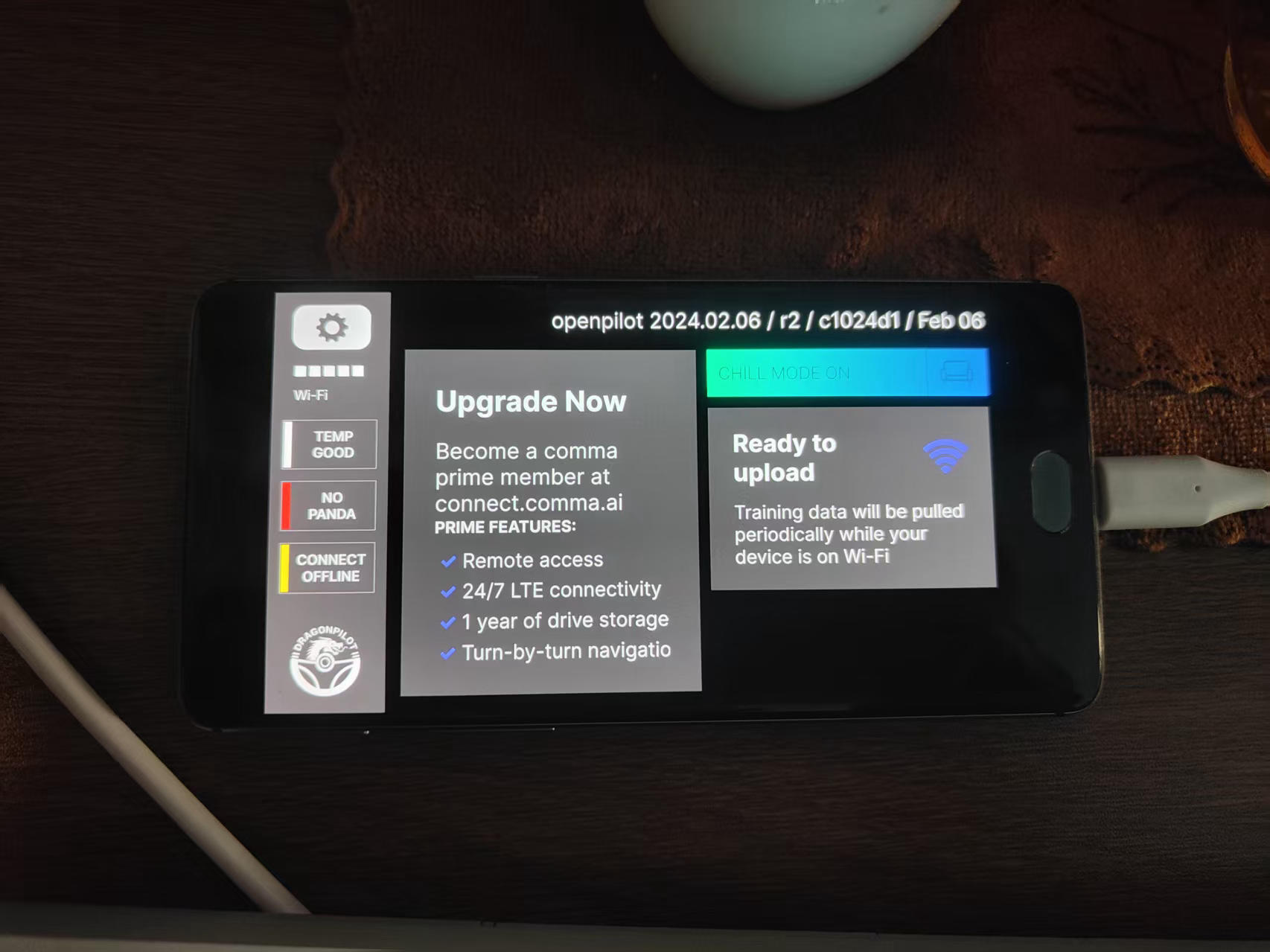
Welcome to the C2 NEOS Alternate Fix Install tool. This tool bypasses a bug in the NEOS setup screen where it always reports 'The network is not connected to the internet' even when it is. ----------------------------------------------------------------------- First, ensure your comma two is on the same Wi-Fi network as this computer. On your device, go to More Options. Touch the triple-dot icon in the upper right corner and select Advanced. Scroll down and note the IPv4 address. It will likely start with 192.168.x.x, 10.x.x.x, or 172.16.x.x. ----------------------------------------------------------------------- Enter the device IP address: 192.168.1.81 Available forks: 1. comma.ai Stock 0.8.13 (release2 branch) (commaai/release2) 2. legacypilot (recommended for "current" use by Mr. One) (dragonpilot-community/d2) 3. dragonpilot (not as stable/enthusiasts) (dragonpilot-community/r2) 4. Custom Select a fork to install: 3 ----------------------------------------------------------------------- Device IP: 192.168.1.81 GitHub Repo: https://github.com/dragonpilot-community/openpilot.git Branch: r2 ----------------------------------------------------------------------- Connecting to device... Starting setup on the device... Changing to /data directory... Removing existing openpilot directory... Cloning openpilot repository... Cloning into 'openpilot'... Checking out files: 100% (1798/1798), done. Patching neos.json for alternate update server... Creating continue.sh script... Making continue.sh executable... Setup complete. Rebooting device...- 自动重启后,就进入DP r2 c1024d1画面了,刷机成功
DP使用
个人最佳设置
- 安装:C2去电池改直供 + Neos20 + D2分支
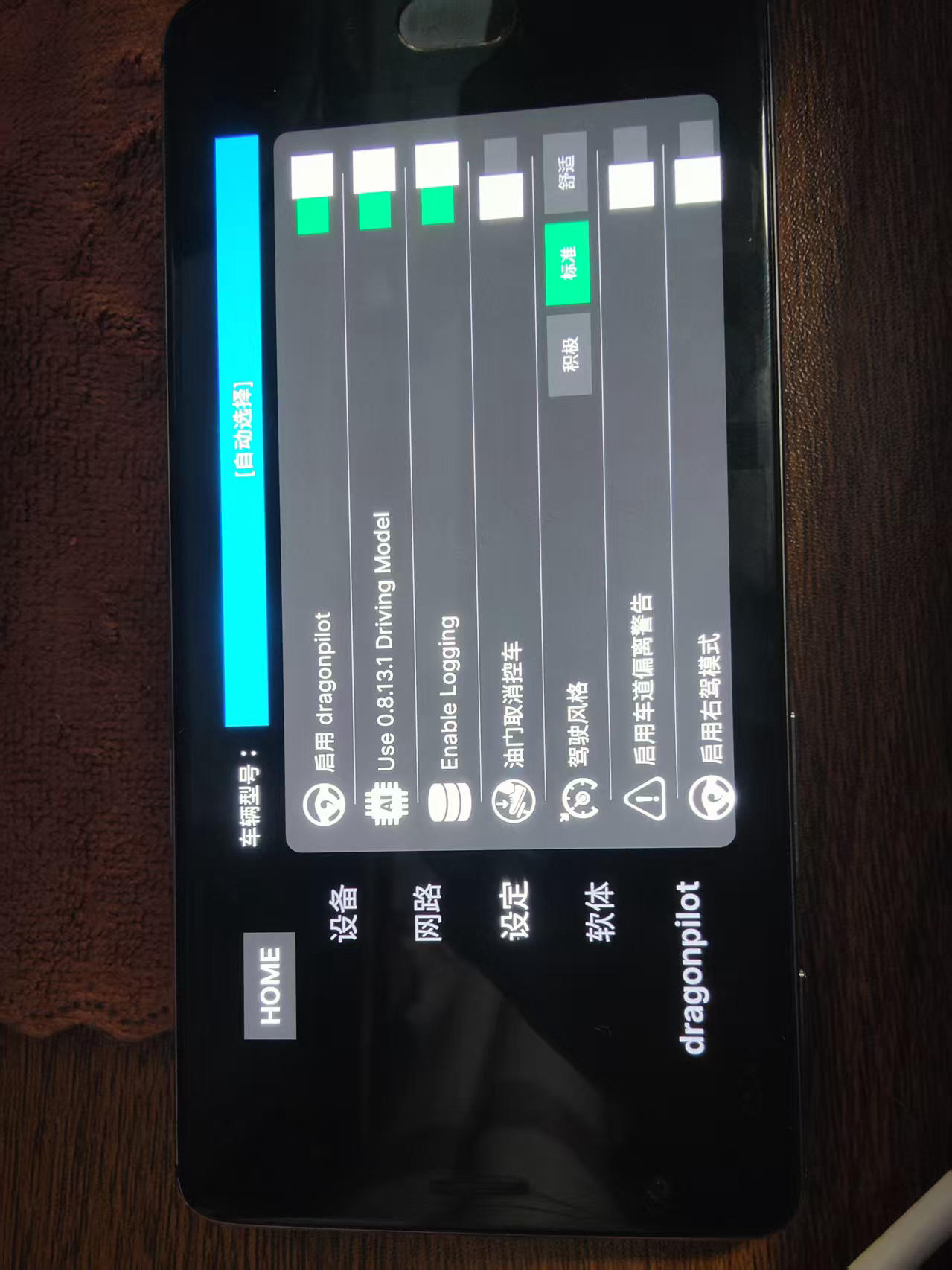
- 设置:公制单位, Lateral Controller选Default
- 代码:屏蔽驾驶员监测,修正摄像头和车道偏移量
- 评价:
- 适应车速范围:30-120 速度
- 适应道路类型:有无车道线,小道,城市公路,省道,高速
- 居中性:居中稳定,不再左右来回打乒乓球
- 过弯能力:过弯不过分贴左右线,过弯平滑
- 功能稳定性:能长时间无人干预下,保持巡航状态能力,不会断连,中断,报警退出等
- 性能:据说neos20性能强化,搭配D2运行可以优化资源发热,0.8.13也能跑。
ssh连接
ssh连接:网络设置里ssh有说明,使用你的github帐号所有公钥,
┌─────────────────────────────────────┐
│ ☁️  公钥上传至自身GitHub账号           │
│ 路径:Settings→SSH and GPG keys      │
└───────────────────┬─────────────────┘
                    ▼
┌─────────────────────────────────────┐
│ 📱 手机DP:网络设置SSH服务              │
│ ├─输入【本人GitHub用户名】             │
│ └─保存授权→设备自动拉取公钥             │
└───────────────────┬─────────────────┘
                    ▼
┌─────────────────────────────────────┐
│ ⌨️  电脑终端执行连接命令               │
└───────────────────┬─────────────────┘
                    ▼
┌─────────────────────────────────────┐
│ 端口22: ssh openpilot@IP            │
└─────────────────────────────────────┘
C:\windows\system32>ssh -i %USERPROFILE%\.ssh\github-rsa-nopsw -T git@github.com Hi ATcn! You've successfully authenticated, but GitHub does not provide shell access. C:\windows\system32>ssh -i %USERPROFILE%\.ssh\github-rsa-nopsw openpilot@192.168.1.81 root@localhost:/data/openpilot$ 成功!
重新校准
- 触发条件1:首次运行
触发条件2:/data/params/d/CalibrationParams 校准结果文件,删除它+重启,触发重新校准
from cereal import log
if __name__ == "__main__":
    with open(r"dragonpilot-d2\params\d\CalibrationParams", "rb") as f:
        b = f.read()

    with log.Event.from_bytes(b) as e:
        cal = e.liveCalibration

        print("status:", cal.calStatus)
        print("validBlocks:", cal.validBlocks)
        print("calPerc:", cal.calPerc)
        print("rpyCalib:", list(cal.rpyCalib))
        print("height:", list(cal.height))

(quant3810)PS D:\codeTrae\TraeProject\dragonpilot> python load.py
status: calibrated  # 标定完成、且在允许范围内
validBlocks: 50  # 有效数据块,满足INPUTS_WANTED=50的期望数据量
calPerc: 100  # 校准进度百分比
rpyCalib: [0.00021808112796861678, -0.029411470517516136, -0.013053220696747303]  # 摄像头相对坐标,弧度

	# Roll 几乎 0:不歪头;
	# Pitch 约 -1.7°:略向下看路;
	# Yaw 约 -0.75°:基本正前方,略向一侧。
height: [1.2200000286102295]  # 摄像头光心离地面的高度
dp运行代码
- /data/params/d 运行参数
- /data/openpilot 项目代码路径
- /data/openpilot/selfdrive/monitoring/driver_monitor.py 驾驶员探活监控
/data/openpilot/selfdrive/legacy_monitoring/driver_monitor.py 驾驶员探活监控
个人行为,请勿模仿
探活机制:方向盘计时,人脸计时,状态警告,中断巡航等
----------------------原代码----------------------
  def update_events(self, events, driver_engaged, ctrl_active, standstill):
    ...
--------monitoring/driver_monitor.py改为---------
  def update_events(self, events, driver_engaged, ctrl_active, standstill):
    self._reset_awareness()
    self.active_monitoring_mode = True
    return
    ...
----legacy_monitoring/driver_monitor.py 改为------
  def update(self, events, driver_engaged, ctrl_active, standstill):
    if True or (driver_engaged and self.awareness > 0) or not ctrl_active:
    ...
----------------------效果------------------------
放开双手永久保持巡航,测试通过!
不是老司机别乱改,对自己负责
/data/openpilot/selfdrive/controls/lib/lane_planner.py: 偏移量
OpenPilot (及其底层使用的库如 cereal 或 common/transformations ) 中对于车辆坐标系(Vehicle Frame)的具体定义。
在绝大多数车辆动力学标准(如 SAE J670)和 OpenPilot 的惯例中:
- X 轴 :指向车辆 前方 。
- Y 轴 :指向车辆 左侧 (Left is Positive)。
- Z 轴 :指向车辆 上方 (Up is Positive)。
这就是所谓的 FLU (Front-Left-Up) 坐标系。
CAMERA_OFFSET: 描述摄像头的修正偏移量,摄像头如在车辆中心左2厘米,则应向Y的左侧修正,为0.02
PATH_OFFSET:描述规划色道的修正偏移量,规划色道在车道中心偏左4厘米,则应向Y的右侧修正,为-0.04

--------------原代码------------
# camera offset is meters from center car to camera
# model path is in the frame of the camera
if EON:
  CAMERA_OFFSET = -0.06
  PATH_OFFSET = 0.0
--------------新代码------------
if EON:
  CAMERA_OFFSET = 0.05
  PATH_OFFSET = 0.00
/data/openpilot/selfdrive/controls/lib/events.py: 报警事件和提示音
找到转弯过大需要介入操作的报警,主要是不需要声音警报
--------------原代码------------
  EventName.steerSaturated: {
    ET.WARNING: Alert(
      _("Take Control"),
      _("Turn Exceeds Steering Limit"),
      AlertStatus.userPrompt, AlertSize.mid,
      Priority.LOW, VisualAlert.steerRequired, AudibleAlert.promptRepeat, 2.),
  },
--------------新代码------------
  EventName.steerSaturated: {
    ET.WARNING: Alert(
      _("Take Control"),
      _("Turn Exceeds Steering Limit"),
      AlertStatus.userPrompt, AlertSize.mid,
      Priority.LOW, VisualAlert.steerRequired, AudibleAlert.promptRepeat, 2.),
  },
驾驶日常
- 40公里dp巡航,ACC故障频发
- 0.7.9, 0.8.1, 0.8.9, 0.8.13, D2:无此问题,非常稳
- R2:多次触发ACC故障,巡航中断,重新点火可恢复正常。
debug UI和ACC稳定性的分析
- Debug UI不见了
- 0.8.13:巡航界面,可以显示车辆角度和预期角度,转速等信息
- R2, D2:没Debug信息了,多了战斗模式,显示指南针和海拔。代码显示,debug显示功能全部移除了。
- 低速巡航(70速度内)
- 0.8.13:完美居中
- D2:有无车道线巡航居中性还可以
- 高速巡航(90速度以上)
- 0.8.13:完美居中
- D2:高速巡航居中性一坨屎,直行来回打乒乓且偏左,左弯死贴左线,右弯正常
- 修改代码里的摄像头偏移量:默认-6即C2在ACC盒正下方,我装在中控屏正上方,偏移量不一致。
- 修改代码里的规划车道偏移量:改完摄像头位置后,按实际巡航车道改,我改为-0.04向右移动
- 界面设置- Lateral Controller:选择Default会很稳,LQR还会有轻微乒乓球
- C2去电池改直供的DC规格:圆头3.5mm,内正外负
安装问题记录
进neos后wifi失败
分析现在的硬件信息
D:\OS\ANDROID\oneplus3T\eonneos\eon-neos-20>adb shell ls -l /dev/block/bootdevice/by-name/|findstr persist lrwxrwxrwx 1 root root 15 1978-08-09 19:31 persist -> /dev/block/sda2 D:\OS\ANDROID\oneplus3T\eonneos\eon-neos-20>adb shell blkid /dev/block/sda2 /dev/block/sda2: UUID="57f8f4bc-abf4-655f-bf67-946fc0f9f25b" TYPE="ext4"blkid输出仅显示分区为 ext4 格式、有 UUID,但无任何 WiFi / 蓝牙 / 射频相关的有效校准数据标识,结合你此前 WiFi 无法开启、扫描失败的现象,可确定该分区内无可用的核心校准文件,内容已完全失效。重建persist
D:\OS\ANDROID\oneplus3T\eonneos\eon-neos-20>adb shell umount /mnt/tmp_persist umount: /mnt/tmp_persist: No such file or directory D:\OS\ANDROID\oneplus3T\eonneos\eon-neos-20>adb shell mke2fs -t ext4 /dev/block/sda2 mke2fs 1.43.3 (04-Sep-2016) Discarding device blocks: done Creating filesystem with 8192 4k blocks and 8192 inodes Allocating group tables: done Writing inode tables: done Creating journal (1024 blocks): done Writing superblocks and filesystem accounting information: done- 将氧9.0.6.zip里的以下文件提出来,逐个刷入
文件名 核心作用 刷入分区(一加 3T 专属) NON-HLOS.bin WiFi / 基带 / 射频核心固件 /dev/block/sde11BTFM.bin 蓝牙核心固件,与 WiFi 联动 /dev/block/sde23devcfg.mbn 设备配置固件,管理硬件驱动加载 /dev/block/sda6cmnlib.mbn 32 位底层校验库,保障固件签名验证 /dev/block/sde26cmnlib64.mbn 64 位底层校验库,适配 Neos64 位系统 /dev/block/sde28rpm.mbn 电源管理固件,保障 WiFi / 蓝牙硬件供电 /dev/block/sde1tz.mbn 可信执行环境固件,避免驱动被系统拦截 /dev/block/sde3D:\OS\ANDROID\oneplus3T\一加官方\OnePlus3TOxygen_9.0.6_firmware>adb push NON-HLOS.bin /dev/block/sde11 NON-HLOS.bin: 1 file pushed, 0 skipped. 22.2 MB/s (85749760 bytes in 3.678s) D:\OS\ANDROID\oneplus3T\一加官方\OnePlus3TOxygen_9.0.6_firmware>adb push BTFM.bin /dev/block/sde23 BTFM.bin: 1 file pushed, 0 skipped. 523.2 MB/s (421888 bytes in 0.001s) D:\OS\ANDROID\oneplus3T\一加官方\OnePlus3TOxygen_9.0.6_firmware>adb push devcfg.mbn /dev/block/sda6 devcfg.mbn: 1 file pushed, 0 skipped. 110.5 MB/s (53552 bytes in 0.000s) D:\OS\ANDROID\oneplus3T\一加官方\OnePlus3TOxygen_9.0.6_firmware>adb push cmnlib.mbn /dev/block/sde26 cmnlib.mbn: 1 file pushed, 0 skipped. 372.9 MB/s (209592 bytes in 0.001s) D:\OS\ANDROID\oneplus3T\一加官方\OnePlus3TOxygen_9.0.6_firmware>adb push cmnlib64.mbn /dev/block/sde28 cmnlib64.mbn: 1 file pushed, 0 skipped. 429.2 MB/s (260392 bytes in 0.001s) D:\OS\ANDROID\oneplus3T\一加官方\OnePlus3TOxygen_9.0.6_firmware>adb push rpm.mbn /dev/block/sde1 rpm.mbn: 1 file pushed, 0 skipped. 277.4 MB/s (229420 bytes in 0.001s) D:\OS\ANDROID\oneplus3T\一加官方\OnePlus3TOxygen_9.0.6_firmware>adb push tz.mbn /dev/block/sde3 tz.mbn: 1 file pushed, 0 skipped. 1065.3 MB/s (1712128 bytes in 0.002s)
底层格式化
底层格式化:fastboot -w
D:\softWin\ProgramFiles_green\XYplorer-24.20.0500>fastboot -w
Erasing 'userdata'                                 OKAY [ 12.187s]
mke2fs 1.46.6 (1-Feb-2023)
Creating filesystem with 14059639 4k blocks and 3515680 inodes
Filesystem UUID: 664440a4-fe8e-11f0-9bf3-f3dbbfae4b04
Superblock backups stored on blocks:
        32768, 98304, 163840, 229376, 294912, 819200, 884736, 1605632, 2654208,
        4096000, 7962624, 11239424

Allocating group tables: done
Writing inode tables: done
Creating journal (65536 blocks): done
Writing superblocks and filesystem accounting information: done

Warning: skip copying userdata image avb footer due to sparse image.
Sending 'userdata' (312 KB)                        OKAY [  0.035s]
Writing 'userdata'                                 OKAY [  0.022s]
Erasing 'cache'                                    OKAY [  0.019s]
mke2fs 1.46.6 (1-Feb-2023)
128-byte inodes cannot handle dates beyond 2038 and are deprecated
Creating filesystem with 65536 4k blocks and 65536 inodes
Filesystem UUID: 6674c710-fe8e-11f0-8b01-01cb9b3cd8f4
Superblock backups stored on blocks:
        32768

Allocating group tables: done
Writing inode tables: done
Creating journal (4096 blocks): done
Writing superblocks and filesystem accounting information: done

Warning: skip copying cache image avb footer due to sparse image.
Sending 'cache' (56 KB)                            OKAY [  0.036s]
Writing 'cache'                                    OKAY [  0.019s]
Finished. Total time: 12.699s
引导信任链
fastboot getvar all 查看系统状态
D:\softWin\ProgramFiles_green\XYplorer-24.20.0500>fastboot getvar all (bootloader) version:0.5 (bootloader) battery-soc-ok:yes (bootloader) battery-voltage:4177000 (bootloader) variant:MTP eMMC (bootloader) unlocked:yes (bootloader) secure:yes (bootloader) version-baseband: (bootloader) version-bootloader: (bootloader) logical-block-size:0x1000 (bootloader) erase-block-size:0x1000 (bootloader) display-panel: (bootloader) off-mode-charge:0 (bootloader) charger-screen-enabled:0 (bootloader) max-download-size: 0x1a400000 (bootloader) partition-type:md5:raw (bootloader) partition-size:md5: 0x80000 (bootloader) partition-type:fsc:raw (bootloader) partition-size:fsc: 0x1000 (bootloader) partition-type:modemst2:raw (bootloader) partition-size:modemst2: 0x200000 (bootloader) partition-type:modemst1:raw (bootloader) partition-size:modemst1: 0x200000 (bootloader) partition-type:sti:raw (bootloader) partition-size:sti: 0x200000 (bootloader) partition-type:splash:raw (bootloader) partition-size:splash: 0x20a4000 (bootloader) partition-type:dpo:raw (bootloader) partition-size:dpo: 0x1000 (bootloader) partition-type:msadp:raw (bootloader) partition-size:msadp: 0x40000 (bootloader) partition-type:apdp:raw (bootloader) partition-size:apdp: 0x40000 (bootloader) partition-type:cmnlib64bak:raw (bootloader) partition-size:cmnlib64bak: 0x40000 (bootloader) partition-type:cmnlib64:raw (bootloader) partition-size:cmnlib64: 0x40000 (bootloader) partition-type:cmnlibbak:raw (bootloader) partition-size:cmnlibbak: 0x40000 (bootloader) partition-type:cmnlib:raw (bootloader) partition-size:cmnlib: 0x40000 (bootloader) partition-type:keymasterbak:raw (bootloader) partition-size:keymasterbak: 0x80000 (bootloader) partition-type:keymaster:raw (bootloader) partition-size:keymaster: 0x80000 (bootloader) partition-type:bluetooth:raw (bootloader) partition-size:bluetooth: 0x100000 (bootloader) partition-type:devinfo:raw (bootloader) partition-size:devinfo: 0x1000 (bootloader) partition-type:recovery:ext4 (bootloader) partition-size:recovery: 0x4000000 (bootloader) partition-type:system:ext4 (bootloader) partition-size:system: 0xbc000000 (bootloader) partition-type:boot_aging:raw (bootloader) partition-size:boot_aging: 0x4000000 (bootloader) partition-type:boot:raw (bootloader) partition-size:boot: 0x4000000 (bootloader) partition-type:LOGO:raw (bootloader) partition-size:LOGO: 0x1000000 (bootloader) partition-type:abootbak:raw (bootloader) partition-size:abootbak: 0x800000 (bootloader) partition-type:aboot:raw (bootloader) partition-size:aboot: 0x800000 (bootloader) partition-type:mdtp:raw (bootloader) partition-size:mdtp: 0x2000000 (bootloader) partition-type:dip:raw (bootloader) partition-size:dip: 0x100000 (bootloader) partition-type:dsp:raw (bootloader) partition-size:dsp: 0x1000000 (bootloader) partition-type:modem:raw (bootloader) partition-size:modem: 0x5f00000 (bootloader) partition-type:pmicbak:raw (bootloader) partition-size:pmicbak: 0x80000 (bootloader) partition-type:pmic:raw (bootloader) partition-size:pmic: 0x80000 (bootloader) partition-type:sec:raw (bootloader) partition-size:sec: 0x4000 (bootloader) partition-type:fsg:raw (bootloader) partition-size:fsg: 0x200000 (bootloader) partition-type:hypbak:raw (bootloader) partition-size:hypbak: 0x80000 (bootloader) partition-type:hyp:raw (bootloader) partition-size:hyp: 0x80000 (bootloader) partition-type:tzbak:raw (bootloader) partition-size:tzbak: 0x200000 (bootloader) partition-type:tz:raw (bootloader) partition-size:tz: 0x200000 (bootloader) partition-type:rpmbak:raw (bootloader) partition-size:rpmbak: 0x80000 (bootloader) partition-type:rpm:raw (bootloader) partition-size:rpm: 0x80000 (bootloader) partition-type:ddr:raw (bootloader) partition-size:ddr: 0x100000 (bootloader) partition-type:cdt:raw (bootloader) partition-size:cdt: 0x1000 (bootloader) partition-type:reserve:raw (bootloader) partition-size:reserve: 0x8000 (bootloader) partition-type:xblbak:raw (bootloader) partition-size:xblbak: 0x3f5000 (bootloader) partition-type:xbl:raw (bootloader) partition-size:xbl: 0x3f5000 (bootloader) partition-type:userdata:f2fs (bootloader) partition-size:userdata: 0xd68877000 (bootloader) partition-type:config:raw (bootloader) partition-size:config: 0x80000 (bootloader) partition-type:reserve2:raw (bootloader) partition-size:reserve2: 0xfd0000 (bootloader) partition-type:reserve1:raw (bootloader) partition-size:reserve1: 0x7e8000 (bootloader) partition-type:param:raw (bootloader) partition-size:param: 0x100000 (bootloader) partition-type:oem_stanvbk:raw (bootloader) partition-size:oem_stanvbk: 0xa00000 (bootloader) partition-type:oem_dycnvbk:raw (bootloader) partition-size:oem_dycnvbk: 0xa00000 (bootloader) partition-type:frp:raw (bootloader) partition-size:frp: 0x80000 (bootloader) partition-type:devcfgbak:raw (bootloader) partition-size:devcfgbak: 0x20000 (bootloader) partition-type:devcfg:raw (bootloader) partition-size:devcfg: 0x20000 (bootloader) partition-type:keystore:raw (bootloader) partition-size:keystore: 0x80000 (bootloader) partition-type:misc:raw (bootloader) partition-size:misc: 0x100000 (bootloader) partition-type:cache:ext4 (bootloader) partition-size:cache: 0x10000000 (bootloader) partition-type:persist:raw (bootloader) partition-size:persist: 0x2000000 (bootloader) partition-type:ssd:raw (bootloader) partition-size:ssd: 0x2000 (bootloader) hw-revision:10001 (bootloader) serialno:83c425ed (bootloader) kernel:lk (bootloader) product:msm8996 (bootloader) oem_project_name:15811 all: Finished. Total time: 1.357s- 底层固件(Firmware)残缺:version-baseband和 version-bootloader全是空白,同时secure: yes,会严格校验启动镜像,如果你刷入的 boot.img(来自 Neos)没有通过签名验证,或者分区映射(Symbolic Links)不匹配,它会直接拒绝启动并掉回 Fastboot。
- Fastboot 和 TWRP 都运行在
aboot之上。如果aboot无法识别它自己的版本,它就像是一个失忆的管家,无论你往房子里搬多少家具(刷多少 ROM),他都不会开门让你进去住。